DMARC Record Generator
DMARC Record Generator
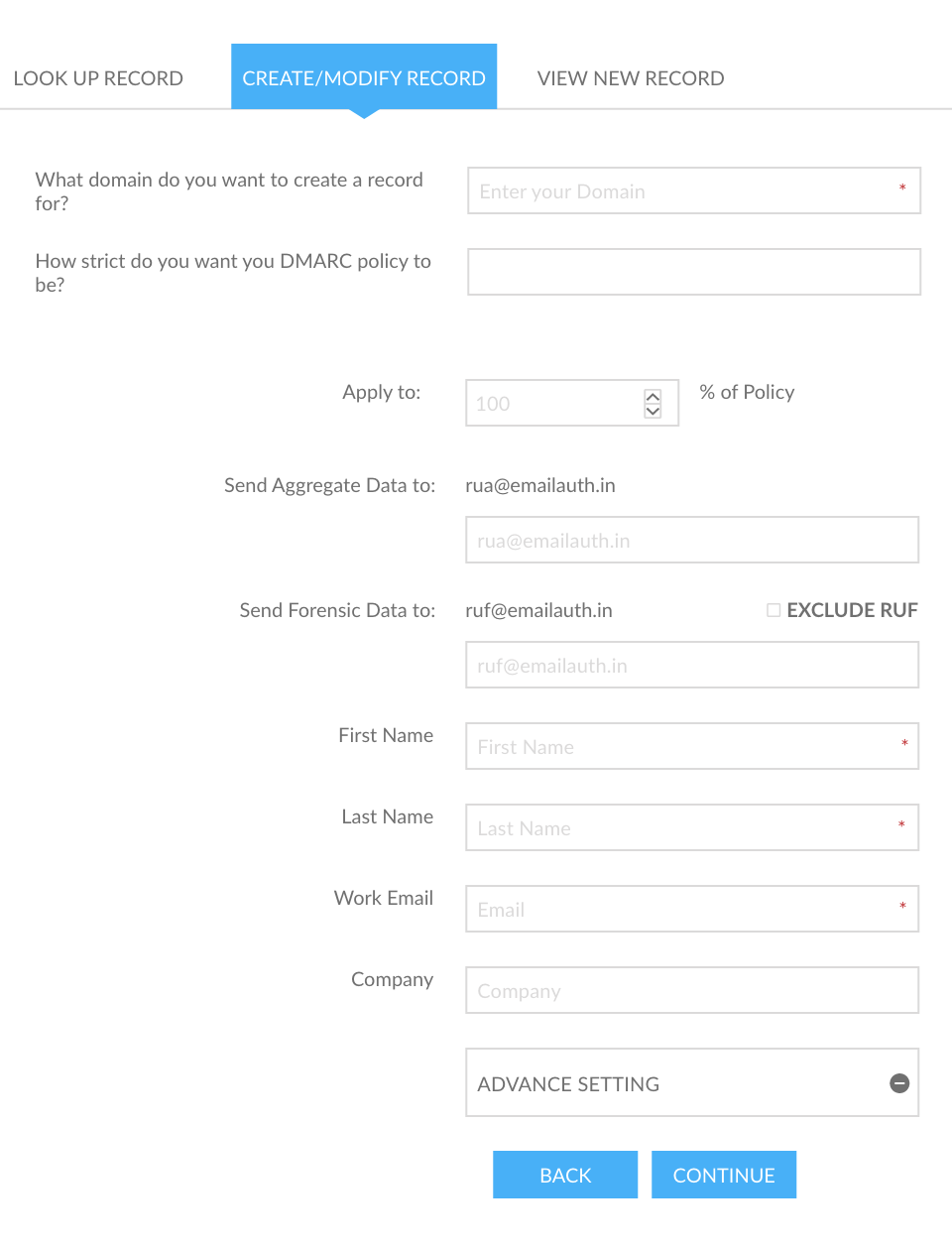
The DMARC Record Generator also allows users to create their own DMARC Record so they can begin tracking and monitoring their domain(s). With this tool, a DMARC record can be generated in the following steps:
- Step 1: Click here to move to our DMARC Record Generator tool.
- Step 2: On the ‘LOOK UP RECORD’ tab, enter your email address and domain name and click on the ‘LOOK UP’ button to verify if DMARC is implemented on your domain.
- Step 3: Go to the ‘CREATE/MODIFY RECORD’ tab and perform the following steps:
- 3.1 Enter your domain name in the box provided.
- 3.2 Select the desired policy from the drop-down list.
- 3.3 In the ‘Apply to’ box, enter the percentage of email messages you want to apply the policy to.
- 3.4 Enter the email address to which you want the RUA reports to be delivered.
- 3.5 Enter the email address to which you want the RUF reports to be delivered.
- 3.6 Enter your ‘First Name, Last Name, Work Email, and Company Name’.
- 3.7 Select your preferred settings from the ‘ADVANCED SETTING’ section.
- 3.8 Click on ‘CONTINUE’.
- Step 4: You will be redirected to the ‘VIEW NEW RECORD’ tab, where you can find your generated DMARC record.