DomainKeys Identified Mail (DKIM)
Overview
DomainKeys Identified Mail (DKIM) is an anti-tamper protocol that ensures that your mail remains secure in transit. DKIM uses digital signatures to confirm whether the email was sent by an authentic domain.
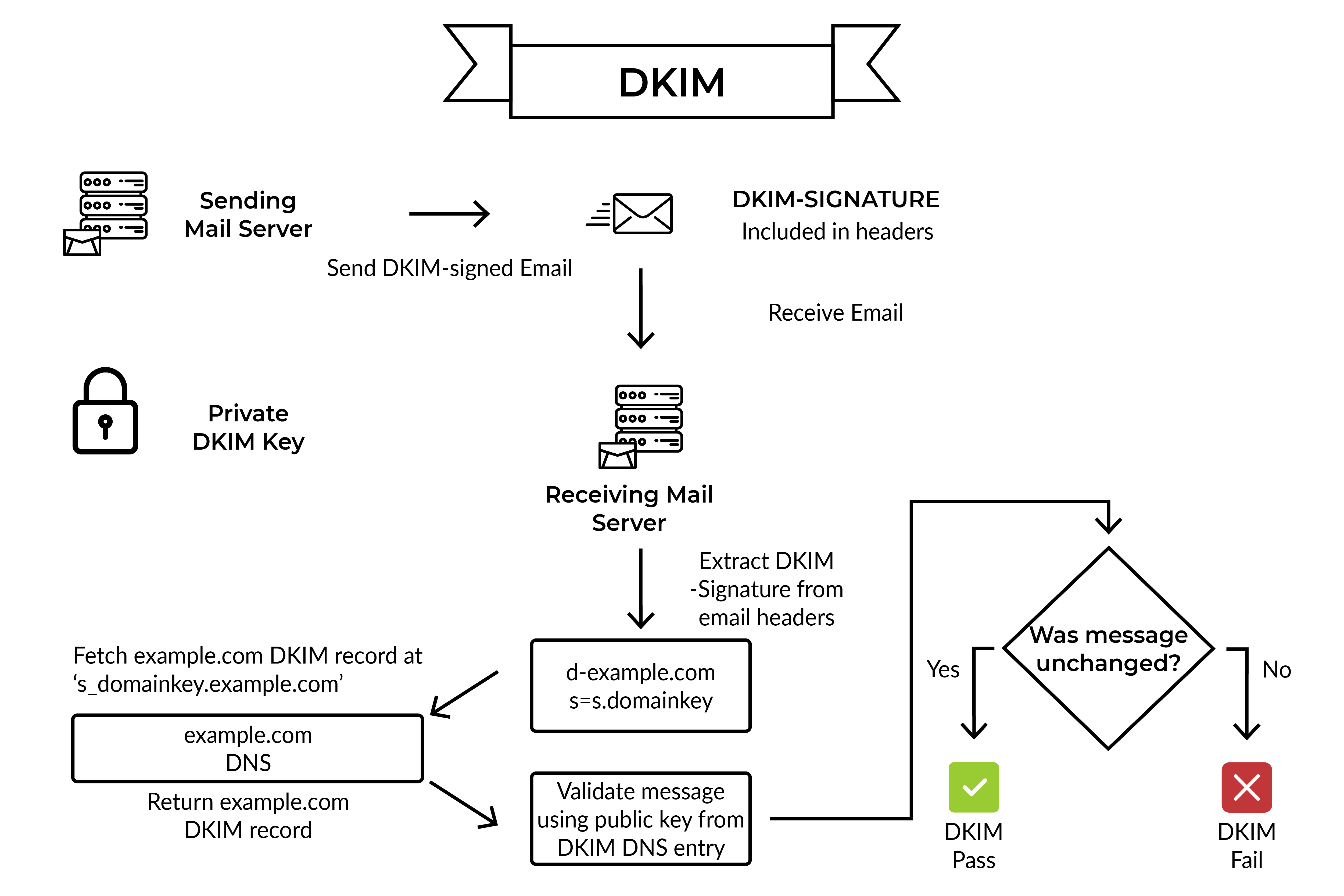
DKIM’s email validation process consists of two actions. The first action is taken when the sending server sends a DKIM signed email. The second action is taken when the recipient server checks the DKIM signature on the incoming email. The entire process is made possible by a pair of private and public keys. The private key must be kept confidential and is saved either on the sender’s own server or with their ESP. The public key, on the other hand, is added to the DNS records of the sender’s domain and broadcasted to the world to help verify all emails.
Once the receiving server verifies that an email holds a valid DKIM signature, it is clear that the integrity of the email is preserved. Usually, DKIM signatures are not visible to end-users and the validation occurs at the server level.
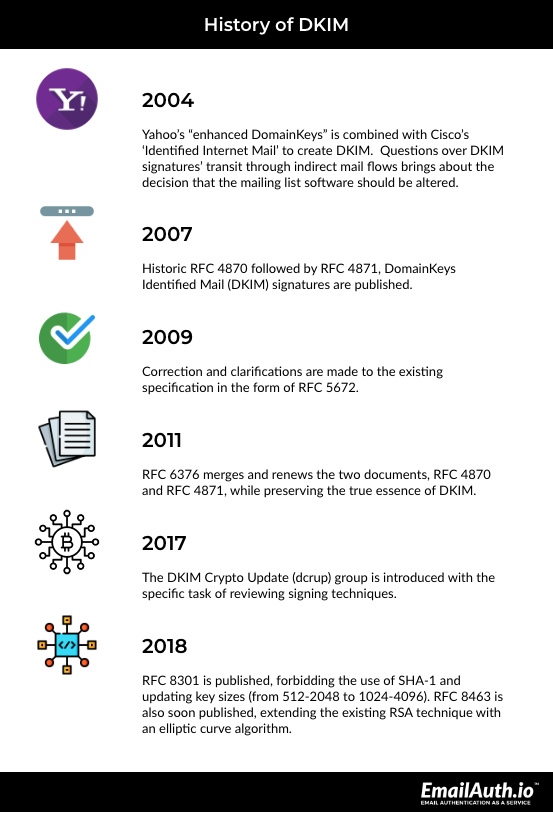
History of DKIM
2004: Yahoo’s “improved DomainKeys” standard to validate an e-mail sender’s DNS domain and message integrity was combined with Cisco’s signature-based mail authentication standard “Identified Internet Mail” to create DKIM.
Questions over DKIM signatures’ transit through indirect mail flows erupted in the DMARC working group almost immediately after its initial adoptions, but none of the proposed DKIM changes passed and it was decided that the mailing list software would be altered.
2007: Historic RFC 4870 followed by standards Track RFC 4871, DomainKeys Identified Mail (DKIM) signatures were published.
2009: In August, the existing specification was updated and published in RFC 5672.
2011: In September, RFC 6376 merged and renewed the two documents, the historic RFC 4870 and standards Track RFC 4871.
2017: The DKIM Crypto Update (dcrup) group was introduced with the specific restriction to review signing techniques.
2018: In January, RFC 8301 was published forbidding the use of SHA-1 and updating key sizes (from 512-2048 to 1024-4096).
In September, RFC 8463, which extended the existing RSA technique with an elliptic curve algorithm, was published.
DKIM was created by an informal industry consortium and then submitted to the IETF DKIM Working Group, chaired by Barry Leiba and Stephen Farrell, for enhancement and standardization. Primary authors include Eric Allman of Sendmail, Jon Callas of PGP Corporation, Mark Delany, and Miles Libbey of Yahoo!, and Jim Fenton and Michael Thomas of Cisco Systems.
Most ESPs like Yahoo, Gmail, Microsoft Office 365, Google Workplace, Exchange servers, and others support DKIM signing and only require some settings to be enabled
How Does DKIM Work?
DKIM adds a digital signature to the header of an email message. This signature can be validated against a public cryptographic key in the organization’s Domain Name System (DNS) records. In general terms, a public key is issued as a TXT record for the domain’s DNS Manager in the DKIM process (registrar of the domain or DNS Provider).
Every outgoing email has its own signature, which is generated using the domain’s private key. This private-public key combination is used by the recipient email server to verify the email source. When an inbound mail server receives an email, it looks up DNS to find the sender’s public DKIM key. This key is used by the inbound server to decrypt the signature and compare it to the newly computed version. If the two values match, the email’s validity and authenticity is proven.
What is a DKIM Signature?
A DKIM signature is an encrypted header that is added to emails. This header provides details that enable a recipient mail server to validate an email by looking up the sender’s public DKIM key and verifying the encrypted signature with it. Here is an example of a DKIM signature:
DKIM-Signature: v=1; a=rsa-sha256; c=relaxed/relaxed;
d=sparkpost.com; s=google;
h=from:content-transfer-encoding:subject:message-id:date:to:mime-version;
bh=ZkwViLQ8B7I9vFIen3+/FXErUlKv33PmCuZAwpemGco=;
b=kF31DkXsbP5bMGzOwivNE4fmMKX5W2/Yq0YqXD4Og1fPT6ViqB35uLxLGGhHv2lqXBWwFhODPVPauUXaRYEpMsuisdU5TgYmbwSJYYrFLFj5ZWqZ7VGgw6/nI1hoPWbzDaL9qh
Read more on DKIM Signature
How is DKIM Related to SPF and DMARC?
The following points describe the DKIM’s relationship with SPF and DMARC:
- Through SPF, senders can specify which IP addresses are allowed to send emails using a specific domain.
- DKIM provides an encryption key as well as a digital signature that ensures that an email message is not forged or tampered with.
- DMARC combines SPF and DKIM authentication procedures and allows domain owners to specify how an email from their domain should be handled if it fails authentication.
Advantages of DKIM
For email receivers, the key benefit is that DKIM allows the signing domain to accurately identify a stream of legitimate emails, making domain-based blacklists and whitelists more effective. It also makes it easier to identify certain types of phishing attacks:
- Spam filtering
DKIM can help identify mail that isn’t known to be spam and does not need to be filtered. If a receiving system maintains a whitelist of authentic sending domains that can be kept locally or obtained from third-party certifiers, it can skip the filtering of signed emails from those domains and filter the remaining emails more aggressively. - Compatibility
DKIM is compatible with existing email infrastructure because it is implemented using DNS records and an extra RFC 5322 header field. It is especially apparent to existing email systems that do not support DKIM. - Anti-phishing
DKIM can be used to defend against phishing attacks. Mailers in intensively phished domains can sign their emails to prove their authenticity. The absence of a valid signature on an email from these domains can be interpreted by recipients as a clue that the email is most likely forged. - Non-repudiation
The non-repudiation feature of DKIM does not let senders deny that they have sent an email. This has been essential to news organizations as they have been able to use DKIM body signatures to confirm that leaked emails were authentic and untampered with.
Limitations of DKIM
Nothing is ever flawless, and nothing can genuinely guarantee total security. DKIM records, too, have a few drawbacks.
- The message envelope that contains the return path and message recipients is not covered by DKIM signatures.
- Because DKIM does not sign all sections of the message and only authorizes certain headers, malicious actors can forge the email by adding more header fields.
- The information validated by DKIM is only on the server-side. End users do not benefit much from the fact that an email is validated by DKIM.
Top 5 Myths about DKIM
Despite the popularity DKIM has gained over the years, there still exists some misunderstanding about what DKIM does and does not do. Following are the top 3 myths regarding DKIM:
- A DKIM signed email can never be a spam
Any mail system can sign incoming emails, which means that spammers, too, can sign their emails. In its most basic form, a DKIM signature contains the signer’s domain and the message’s checksum. If you get a message with a valid DKIM signature, all that can be interpreted from it is that the incoming email was the same as the one signed by the signer. This is because the checksum verifies that the domain’s masked email is legitimate. When you have a stream of emails signed by the same domain, DKIM becomes useful. - A DKIM signature guarantees that the information in the header is authentic
No, a DKIM signature just signifies that the incoming email is the same as the one signed by the sender. Signers can sign whatever they wish. Even if the signing domain matches the domain component of the ‘From:’ address, which is referred to as a ‘first party’ signature, there’s no guarantee that the ‘From:’ line you see is the one they signed. DKIM provides email encryption
No, DKIM does not encrypt emails. It simply uses digital signatures to confirm whether the email was sent by an authentic domain. The private key used by DKIM is saved either on the sender’s own server or with their ESP. The public key, on the other hand, is added to the DNS records of the sender’s domain and broadcasted to the world to help verify all emails.A message with an invalid DKIM signature is always forged.
A message that fails DKIM validation is not always forged. There can be many other reasons, such as the sender does not have DKIM configured or some of your email filtering systems might be blocking it. One of the most common scenarios is when the message comes from a legitimate third-party system that does not have DKIM configured.Because DKIM details are published in the DNS, they can be forged.
DKIM cannot be forged. The entire DKIM validation process is made possible by a pair of private and public keys. The private key must be kept confidential and is saved either on the sender’s own server or with their ESP. The public key, on the other hand, is added to the DNS records of the sender’s domain and broadcasted to the world to help verify all emails.
Steps to set up DKIM
DKIM configuration has three simple yet major steps.
- Generate a public domain key for the concerned domain.
- Add the public key to the DNS entries for that domain. This key can be used by email servers to validate DKIM signatures in your messages.
- To begin applying a DKIM signature to all outgoing messages, enable DKIM signing.
For detailed information check DKIM Setup Guide
To validate your DKIM signature, head to EmailAuth’s DKIM Record Checker
Why Does DKIM Validation Fail?
A DKIM check fails when the DKIM authentication fails. A DKIM check failure occurs when:
- The sender’s domain and the DKIM signature domain do not match.
- The DKIM public key entry in DNS is either inaccurate or non-existent.
- The DNS zone for the sender’s domain is unavailable for lookup.
- The DKIM key, which is used for signing, is too short.
- The email body is altered during the auto-forward process.