BIMI Record Generator
Creating a BIMI Record
The following steps will guide you through the process of creating a BIMI record for your domain:
- Obtain a copy of your brand logo and convert it to SVG format. The image must be a squared logo that does not contain any extra text. For a more comprehensive guide on how to create the image.
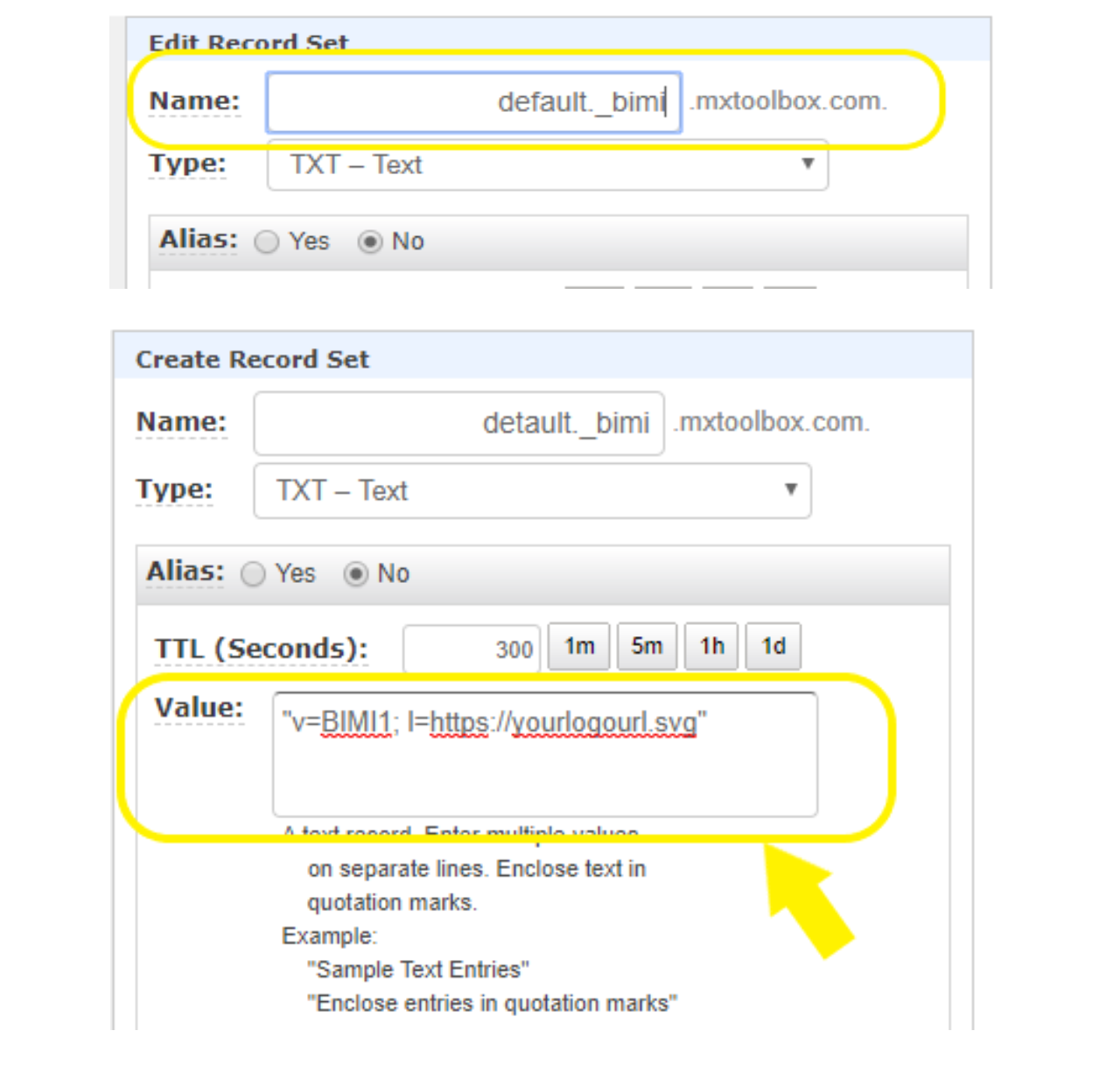
- Go to the DNS hosting provider and select ‘Create Record’.
- Add host value. You will probably enter the value _bimi and the hosting provider will append the domain/subdomain following that provided value.
- Select the ‘TXT’ option from the dropdown list of DNS record types.
- Add ‘Value’ information.
- Click the ‘Save Record Set’ button to generate a new BIMI record.
- Run a BIMI record check to verify the record you just created has the correct values and syntax.
Summary
A simple technique to improve a brand’s reputation is to create a BIMI record for the brand’s logo so that customers can view it in their inboxes. Not only does this prompt current and prospective clients’ confidence in the email authenticity, but it also gives them a sense of trust. In turn, the organization will gain more visibility and attract more customer clicks as the brand logo appearing alongside all emails will make the communication stand out in the recipient’s inbox.