EmailAuth EmailAuth
  • Resources
    • DMARC
        • What is DMARC?
        • Benefits of DMARC
        • What is a DMARC Record?
        • DMARC Record Generator
        • RUA and DMARC Aggregate Reports
        • RUF and DMARC Forensic Reports
        • DMARC Set up guides
        • DMARC Dictionary
    • SPF
        • What is SPF?
        • How common is the SPF problem?
        • SPF Record
        • SPF Record Checker
        • How to create an SPF TXT record?
        • How to validate your SPF record?
    • DKIM
        • What is DKIM?
        • What is a DKIM Signature?
        • DKIM record checker
        • DKIM Setup Guide
    • BIMI
        • What is BIMI?
        • How to create BIMI record?
        • How to create BIMI SVG logo?
  • Solutions
    • By Threat
        • Business Email Compromise
        • Vendor Email Compromise
        • Consumer Phishing
        • Social Engineering
        • Spear Phishing
        • Account Takeover
        • Data Breach
        • Ransomware
    • By Need
        • Advanced Email Security
        • Office 365
        • MS Exchange
        • G Suite
        • DMARC Email Authentication
        • BIMI Brand Impressions
        • Phishing Incident Response
        • Phishing Simulation & Training
        • Remote Workforce Protection
    • By Industry
        • Financial Institutions
        • Healthcare
        • Government
        • Legal
        • Information Technology
        • Retail
        • Marketing
        • Charity
        • Manufacturing
        • FMCG
  • Why EmailAuth?
    • About
    • Features
    • Managed Services
    • Careers
    • Partners
      • Become a Partner
    • Contact
  • Free Tools
      • Check your DMARC
      • Check your DKIM
      • Check your SPF
      • Generate your DMARC
  • Knowledge Center
      • Blog
      • Articles
      • Newsroom
Request demo

How to Create BIMI SVG Logo?

  • Requirements
  • BIMI Logo Requirements

    To prepare for BIMI, DMARC enforcement, which comes with some restrictions, needs to be established. You will also need a BIMI logo in the correct format, as well as a Verified Mark Certificate (VMC) that verifies the logo as belonging to your company. If the logo does not meet the prerequisites, it may not be visible. Here are some of the requirements of a BIMI logo:

    • The logo should be square so that proper fitting is ensured
    • It must be in SVG Tiny Portable/Secure format
    • It must have a solid background so that brand guidelines are not impacted by different display environments
    • The BIMI logo must be published on a domain with a SSL Certificate (via HTTPS)
    • The logo must be vector-based
    • The SVG file should be compact and cannot exceed 32KB

  • SVG logo
  • Steps to Create a BIMI SVG Logo

    The following steps guide you through the process of creating an SVG file that can be used for the BIMI record:

    1. Open your vector-based file in Adobe Illustrator.
    2. Click ‘File > Save As’, following which the ‘Save As’ dialog box appears.
    3. In the ‘Save As’ dialog box, provide the name for your file. From the ‘Format’ dropdown, select ‘SVG (svg)’, and then click ‘Save’. This will bring up another dialog box.
    4. In the dialog box, from the ‘SVG Profiles’ dropdown, select ‘SVG Tiny 1.2’, from the ‘Image Location’ dropdown, select ‘Preserve’, and click ‘OK’. 
    5. Open the SVG file that you just created in a code/text editor. There are a number of free tools that you can use. Here are some suggestions:
      Atom
      CodePen (no sign up necessary)
      Nano
      Sublime Text
      Vim
      Visual Studio Code
    6. In the code editor, make the following changes to the file:
      6.1. If your image contains x/y attributes, remove them.
      6.2. Change the base Profile from ‘tiny’ to ‘tiny-ps’.
      6.3. Add a title. This must not be more than 64 characters.
      6.4. Save the modified (SVG) file.
      6.5. Upload the SVG file to the server for which the BIMI record is configured.
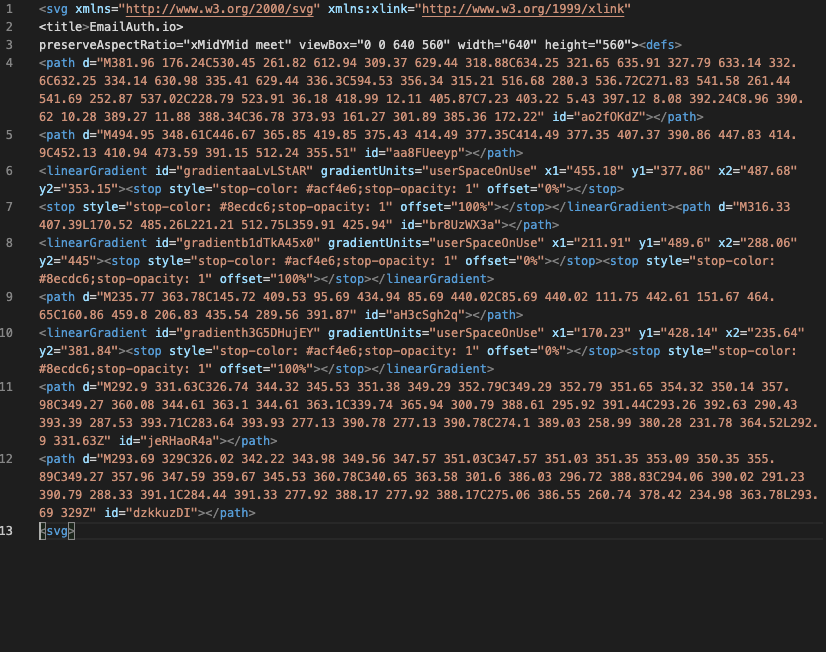
    BIMI SVG
  • BIMI SVG file
  • Troubleshooting the BIMI SVG File

    1. Check for bitmap image embedded in the SVG file
    Non-vector (bitmap) elements like scripting and external linking, and referencing according to the BIMI logo specifications are incompatible with the standard and will affect logo display. This can be difficult and sometimes impossible to see with naked eyes. To find out if a bitmap image has been added, check the SVG file.
    To inspect your SVG file for bitmap images, follow these steps:

    • Download your logo and inspect it by opening your image in a browser. To do this, right-click your logo > Open with > Select your browser.
    • When the image is visible, right-click your logo > View page source.
    • In the image code, search for ‘img/’. If the search returns a result it can be assumed that the SVG file contains a bitmap image and, hence, does not match the prerequisites of the BIMI logo.


    Example
    : When the next line (file.Xlink:href=”data:img/png;base64) is found, the SVG file contains a reference to a PNG (Bitmap) making it incompatible.

    Solution: Reach out to the designer of the logo to modify the file to make it a completely vector-based file.

    2. Ensure that the file does not contain any unnecessary data or links
    Even if the format of the file indicates that it is a ‘.svg’ file, it may still contain data or links that are not required, which could generate issues. Follow the same steps mentioned above to inspect your logo for unnecessary data. If you find any, delete it by editing your file using any text editor of your choice.

     For more detailed information, read what is BIMI?

     Follow these steps to create a BIMI record.

    Ready to get started?

    Request demo
    emailauth

    global cyber alliance certified emailauth
    csa
    iso certified powerdmarc

    Knowledge
    • DMARC Email Authentication
    • What is DMARC?
    • What is SPF?
    • What is DKIM?
    • What is BIMI?
    • What is a DMARC Record?
    • What are DMARC Forensic Reports?
    • What are DMARC Aggregate reports?
    Tools
    • DMARC Record Generator
    • SPF Record Generator
    • SPF Record Checker
    • DKIM record checker
    • Check your DKIM
    • BIMI record generator
    • BIMI Brand Impressions
    Try Us
    • Become a Partner
    Social Links


    Emailauth All rights reserved.
    • Privacy Policy
    We use cookies on our website to give you the most relevant experience by remembering your preferences and repeat visits. By clicking “Accept All”, you consent to the use of ALL the cookies. However, you may visit "Cookie Settings" to provide a controlled consent.
    Cookie SettingsAccept All
    Manage consent

    Privacy Overview

    This website uses cookies to improve your experience while you navigate through the website. Out of these, the cookies that are categorized as necessary are stored on your browser as they are essential for the working of basic functionalities of the website. We also use third-party cookies that help us analyze and understand how you use this website. These cookies will be stored in your browser only with your consent. You also have the option to opt-out of these cookies. But opting out of some of these cookies may affect your browsing experience.
    Necessary
    Always Enabled
    Necessary cookies are absolutely essential for the website to function properly. These cookies ensure basic functionalities and security features of the website, anonymously.
    CookieDurationDescription
    cookielawinfo-checkbox-analytics11 monthsThis cookie is set by GDPR Cookie Consent plugin. The cookie is used to store the user consent for the cookies in the category "Analytics".
    cookielawinfo-checkbox-functional11 monthsThe cookie is set by GDPR cookie consent to record the user consent for the cookies in the category "Functional".
    cookielawinfo-checkbox-necessary11 monthsThis cookie is set by GDPR Cookie Consent plugin. The cookies is used to store the user consent for the cookies in the category "Necessary".
    cookielawinfo-checkbox-others11 monthsThis cookie is set by GDPR Cookie Consent plugin. The cookie is used to store the user consent for the cookies in the category "Other.
    cookielawinfo-checkbox-performance11 monthsThis cookie is set by GDPR Cookie Consent plugin. The cookie is used to store the user consent for the cookies in the category "Performance".
    viewed_cookie_policy11 monthsThe cookie is set by the GDPR Cookie Consent plugin and is used to store whether or not user has consented to the use of cookies. It does not store any personal data.
    Functional
    Functional cookies help to perform certain functionalities like sharing the content of the website on social media platforms, collect feedbacks, and other third-party features.
    Performance
    Performance cookies are used to understand and analyze the key performance indexes of the website which helps in delivering a better user experience for the visitors.
    Analytics
    Analytical cookies are used to understand how visitors interact with the website. These cookies help provide information on metrics the number of visitors, bounce rate, traffic source, etc.
    Advertisement
    Advertisement cookies are used to provide visitors with relevant ads and marketing campaigns. These cookies track visitors across websites and collect information to provide customized ads.
    Others
    Other uncategorized cookies are those that are being analyzed and have not been classified into a category as yet.
    SAVE & ACCEPT